

API, Web, Desktop, Mobile, Bots, CLI
GAIA on iMessage, Approvals Before Risky Actions & Plans You Can Buy From Chat
GAIA now texts you on iMessage, asks before it does anything destructive, and can read the documents and images you send it. Plans and usage limits are live — you can upgrade to Pro without leaving the conversation — and there’s a new bridge that lets GAIA work with tools and files on your own machine. The marketing site, the workflow builder’s explore page, and the mobile chat experience were all rebuilt along the way.API v0.22.0
Features
- Approvals Before Destructive Actions: GAIA now pauses and asks you first before running a tool that deletes, sends, or overwrites something, and remembers the per-tool permissions you set.
- Device Bridge: A secure local bridge lets GAIA reach MCP servers and files on your own machine, so it can work with what’s actually on your computer.
- Documents Read In-House: Text-based PDFs, plus DOCX, XLSX, PPTX, and CSV files, are now extracted on our own servers rather than sent to a cloud parser, so attachments process faster. Scanned and image-based PDFs are the exception — they still go to a third-party OCR service, because reading them requires it.
- Images and Screenshots: GAIA reads images natively, keeps the screenshots it takes, and can download files from a URL to work with them.
- Gmail Inbox Summary: A dedicated tool summarizes your inbox, with cleaner email bodies so long threads read properly.
- Plans and Usage Limits: Free accounts now have clear daily caps and Pro runs on cost-based limits, with usage tracked per turn instead of guessed.
- Upgrade From the Conversation: Ask GAIA to upgrade and it hands you a real checkout link for Pro, instead of pointing you at a pricing page.
- Ask About Your Own Billing: GAIA can now answer “am I on Pro?”, what you pay, when you renew, and what you were recently charged, from your live subscription rather than a canned pricing link — it will never cancel, refund, or discount anything on its own.
- iMessage as a Platform: Link your number and talk to GAIA over iMessage like any other chat platform, included with Pro.
- A Faster Default Model: DeepSeek V4 Flash 0731 is the new default model on every tier.
- Lifecycle Emails: A new email engine sends onboarding and nurture sequences, built on a provider-agnostic email service.
- Better Workflow Creation: Creating a workflow now runs through a structured pipeline that discovers the integrations it needs instead of guessing at them.
Improvements
- Model Failover That Holds Context: Each turn resolves one model lane up front, so a provider failure now falls over cleanly without dropping your queued messages or a pending approval.
- Replies That Sound Less Like AI: GAIA’s writing is scored against a list of AI tells — em dashes, the “it’s not X, it’s Y” construction — and the prompt no longer models the habits it tells the model to avoid.
- Fresher Trigger Catalog: Every app trigger’s schema and slug is back in sync with the live Composio catalog, so event-based workflows fire on the right shape of data, and removing a trigger that’s already gone no longer errors.
- Dormant Workflows Pause Themselves: A daily sweep pauses active workflows for accounts that have gone quiet, so nothing keeps firing in the background months after you stopped using it. They resume automatically the next time you log in.
- New License: GAIA is now licensed under PolyForm Noncommercial 1.0.0 instead of PolyForm Strict.
Bug Fixes
- Reminders Search: Searching your reminders failed on every call; it works again.
- Email Triggers Don’t Stampede: A busy inbox now batches into a single agent run instead of one run per message, which previously burned a day’s usage in minutes.
- Quiet Background Runs: Scheduled workflow runs no longer email you about hitting a limit, and no longer run before you’ve finished onboarding.
- Workflow Reset: Resetting a system workflow to its default now actually uses the new prompt instead of quietly running the old one.
- Reliable Scheduled Workflows: Scheduled runs reschedule correctly and no longer fail on tool results that couldn’t be serialized.
- Failed Runs Are Reported as Failed: A workflow run that errored used to be recorded as a success, which meant broken workflows kept firing forever instead of being retired.
- No More Stray Markers in Replies: The internal marker GAIA uses to split a long answer into separate messages sometimes reached you as literal text; every outbound path now runs through one parser.
- The Worker Acts on What You Asked: Longer tasks are handed to the background agent using your original wording, instead of a paraphrase that could drift from the request.
- Unconnected Integrations: Asking about an app you haven’t connected now returns a clear message instead of an error.
- Calendars With Special Characters: Calendar and event IDs are URL-encoded everywhere, fixing 404s on calendars whose IDs contain special characters.
- Sandbox Resume: Resuming a code sandbox that had been evicted no longer 404s.
- Memory Hygiene: A memory is only retired when a newer one genuinely restates it, so facts about you stop disappearing.
- No Internal Paths in Replies: GAIA no longer leaks internal server file paths into its answers.
- Platform Results Are Continuable: Results delivered to a linked platform are now recorded in the conversation, so you can reply and keep going.
- Security Fixes: Audited SSRF, IDOR, auth, and webhook findings across the codebase were remediated, along with 192 of 196 outstanding dependency advisories.
Performance
- Cheaper, Faster Turns: The prompt prefix is now stable across a conversation, so follow-up turns hit the provider’s cache instead of re-paying for the whole history.
- Leaner Tool Results: Large tool outputs are compacted into a digest before they reach the model, keeping long tool chains fast.
- Long Conversations Stay Light: Saved conversation state no longer stacks a fresh copy of the system prompt on every run, which had been quietly growing the cost of every follow-up.
- Steadier Memory Search: Embedding and vector writes are now bounded, fixing the file-handle exhaustion that could stall memory lookups under load.
Infrastructure
- Safer Deploys: Every build now gets a permanent tag, so rolling back means returning to an exact known-good version. If a build never makes it to production, we get alerted instead of never noticing.
- A Faster CI Gate: Checks on a pull request dropped from 13.4 to 8.9 minutes. Five of them had been quietly measuring an easier thing than they claimed to; they now measure the real one.
- One Branch: The
developbranch is gone. Everything merges straight tomaster. - Silenced Warnings Have to Explain Themselves: Every ignored lint or type error now records why it’s there, and the cleanup removed all the stale ones nobody could account for.
- Everything Logs the Same Way: API, bots, and background workers now share one logging format, and the alerts were rewritten so that when one fires, it says what actually broke.
- Tests That Run the Real Agent: We can now drive the agent end to end and get the same result every time, so tests exercise real behaviour instead of stand-ins.
- A Typed Database Layer: All 33 collections go through typed code now, and model pricing moved into the codebase instead of a table that could quietly drift out of date.
- Easier Self-Hosting: Simpler local setup, a configurable sandbox region for EU deployments, and one identity for all secrets.
Documentation
- Privacy Policy and Terms: Both rewritten from scratch to describe what GAIA actually stores, processes, and shares.
Web v0.23.0
Features
- A New Marketing Site: The homepage, navbar, footer, pricing page, and product demos were rebuilt from scratch.
- Explore Workflows, Redesigned: A curated set of starter workflows with their own icons and cards, so there’s something to run on day one.
- Pick Your Apps During Onboarding: Onboarding now asks which integrations you use and suggests workflows built from them, instead of starting you on an empty page.
- Workflows Tell You What They Need: Turning on a workflow whose steps need an app you haven’t connected now explains which one is missing, rather than activating and failing later.
- A Better Composer: The character limit is gone, pasted images become attachments, and you can upload files directly from the composer.
- Clearer Pricing: Plan features show the platforms they cover inline, iMessage is marked as Pro, and the yearly plan gives two months free.
- Founder’s Letter: A letter from the founder with an early-bird discount for the first users.
Bug Fixes
- Failures Are Visible: When the model fails, the chat now says so instead of stalling, and it stops piling retry on retry.
- Notifications: The notification list honours its limit, drops dead routes, and runs off one hook instead of two that disagreed.
- Workflow Icons: Cards now render the icon you picked for a workflow.
- Canvas Documents: The canvas document viewer 404’d on every open; it loads again.
- Landing Pages: Fixed an infinite prefetch loop and a navbar hydration mismatch on production landing pages.
- Recovering From Stale Assets: A deploy mid-session no longer leaves you on a broken route — the app reloads the route instead.
- Private Browsing: When the browser refuses to open the local database the chat history is cached in — a private window, or hardened privacy settings — that layer quietly turns itself off instead of breaking the page.
- Search Listings: Page titles are single-brand, utility pages are noindexed, and the sitemap reports honest signals.
- Texting GAIA on a Non-Apple Device: The iMessage page now shows the number to text instead of a deep link only Apple devices could open.
Infrastructure
- Next.js 16.3 and TypeScript 7: The web app moved to Next.js 16.3 and onto TypeScript 7’s new native compiler, which made builds and type-checking noticeably faster.
- One Deploy Path: Removed the leftover Vercel setup, and a change that touches both the backend and the web app now ships them together instead of one at a time.
- Cleaner Error Reports: Crashes caused by browser extensions no longer show up as GAIA errors, so what’s left is actually ours.
Mobile v0.8.0
Features
- The Full Tool Chain on Mobile: Streaming now shows the same tool chain the web app does, including subagent activity and approval prompts you can answer from your phone.
Bug Fixes
- Chat Streaming and Sync: Fixed streaming correctness, brought markdown rendering to parity with the web app, and repaired conversation sync so threads match across devices.
Desktop v0.6.0
Features
- Attachments and Inbox Tools: The desktop app picks up local document extraction and the Gmail inbox summary alongside the rest of the apps.
Bug Fixes
- Links Open Where They Should: A link to another site now opens in your normal browser instead of taking over the app window, and links using a non-web scheme are refused rather than handed to the operating system.
- Security Fixes: Picked up the monorepo-wide security and dependency remediations.
Bots v1.6.0
Features
- iMessage: GAIA is now available on iMessage for Pro users, joining Discord, Slack, Telegram, and WhatsApp.
Bug Fixes
- Whole Replies, Every Time: Long answers are no longer truncated or split into lost bubbles — every platform now uses one message splitter.
- Long Turns Stay Connected: The bot connection survives a slow turn behind a proxy instead of dropping the reply.
- Usage Counts Everywhere: Messages sent through a bot now count against your plan the same way web chat does, and hitting the limit hands you a working upgrade link instead of telling you to go find the web app.
- Fewer Dropped Turns: Fixed an authentication mismatch that made almost every bot message retry before it went through.
Infrastructure
- Every Bot Ships Like a Real Service: All the bots, iMessage included, now release under exact version tags a deploy can pin to.
- A Dead Bot Gets Noticed: The iMessage bot is health-checked like the others, so if it goes down we hear about it before you do.
CLI v0.5.0
Features
- Bridge Included: The device bridge now ships inside the published CLI, and the device pairing page was reworked so connecting your machine takes one step.
API, Web, Desktop, Mobile, Bots
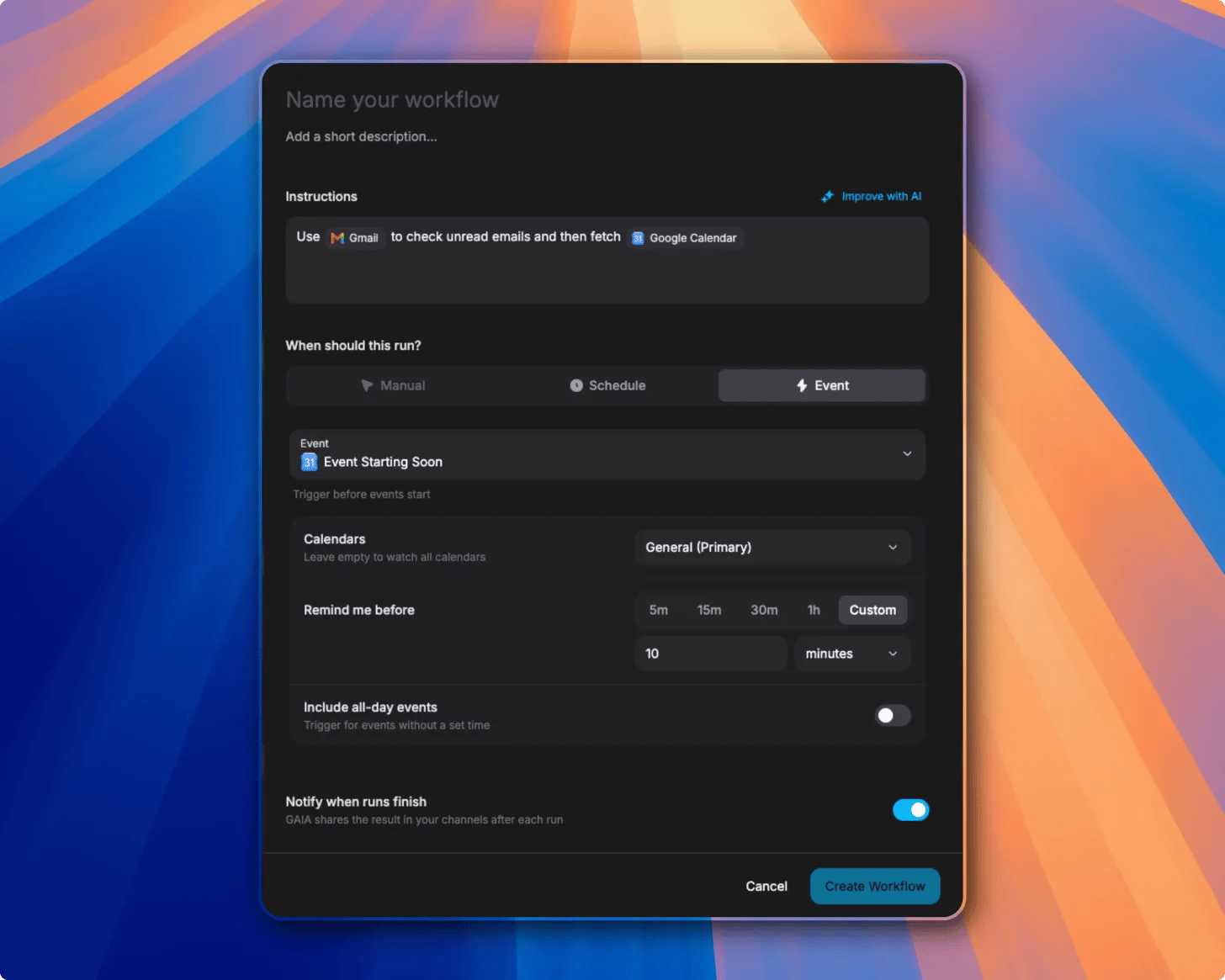
The New Workflow Builder, Sturdier Agents & a Faster App
A redesigned workflow builder leads this release. The agent is more reliable too — it now falls back to a default model when your chosen one fails, and fails over across multiple web-search providers — while the web app gains instant navigation, a refreshed generated-UI library, and a top-to-bottom overhaul of the chat bots.API v0.21.0
Features
- Automatic Model Fallback: If your selected model fails — for example a paid model that runs out of provider credits — GAIA retries transient errors and then falls back to the default model, so the turn still completes instead of erroring out.
- Resilient Web Search: Web search now fails over across multiple providers (Exa, SearXNG, Tavily, Brave, and DuckDuckGo), so it keeps working when one is rate-limited or down. Webpage fetching in production was also repaired.
- Workflow Results in Your Chats: When a workflow finishes, its result now arrives as a real, continuable message in GAIA’s voice inside your linked platform conversations — not just a templated “workflow done” notification.
- Richer Marketplace Listings: Publishing a custom integration now auto-generates tailored “What you can do”, “How it works”, and FAQ content instead of falling back to generic copy.
- Shorter Connect Links: Integration connect links are now short, single-use codes on the branded domain instead of long token URLs.
- Per-Server MCP Icons: MCP server icons now resolve per host, so servers that share a domain each get their own favicon.
Performance
- Faster Agent State: Reworked conversation checkpoint storage to remove O(N²) growth, keeping long conversations fast.
- Faster Code Sandbox: A more reliable sandbox file mount cut cold starts from roughly 76–104s to about 31s, and warm starts to about 2s.
Web v0.22.0
Features
- The New Workflow Builder: A redesigned builder — describe a workflow in plain language, @-mention the apps it should use (Gmail, Google Calendar, Slack, and more appear as inline chips), and let “Improve with AI” turn it into runnable steps.
- Flexible Triggers: Run a workflow yourself, on a schedule, or from an app event, each with its own settings card — which calendars to watch, how far ahead to run with preset or custom intervals, whether to include all-day events — plus a toggle to notify you when runs finish.
- Redesigned Generated UI: Adopted the official OpenUI React component library, themed to GAIA, so agent-generated charts, tables, and forms render consistently and support more layouts.
- Resume Checkout After Signup: Picking a paid plan while logged out now sends you through signup and back into checkout, instead of showing an error.
Improvements
- Instant Navigation: Upgraded to Next.js 16.2.9 with streaming loading states and per-section error boundaries, so pages load and transition faster.
- Marketplace Detail Pages: Integration detail pages now show their curated content, correct tool names, and a cleaner layout.
- Smoother Publishing: The publish dialog now closes immediately and takes you straight to your published integration, and stale connect parameters are cleared.
Bug Fixes
- Reliable Attachments: Sending is now blocked until composer attachments finish uploading, so images are never dropped by sending mid-upload.
- Workflow Trigger Options: Restored the trigger-option dropdowns in the workflow builder.
- Planning Header: The chat planning header now shows an integration’s name instead of its internal id.
- Readable Links: Links inside your own chat bubbles are now legible.
- Notifications: Fixed the notification tool’s schema and UI.
Desktop v0.5.0
Bug Fixes
- Logout Routing: Logging out now returns you to the desktop login screen instead of the landing page.
Mobile v0.7.0
Features
- Redesigned Generated UI: The mobile app adopts the same official OpenUI React component library, themed to GAIA, so agent-generated charts, tables, and forms render consistently on mobile.
Bots v1.5.0
Bug Fixes
- Cross-Platform Overhaul: An end-to-end pass across Discord, Slack, Telegram, and WhatsApp improved markdown rendering, streaming, media handling, and account-linking. Notably, Discord DMs are no longer silently dropped after the bot restarts.
API, Web, Desktop, Mobile, Bots
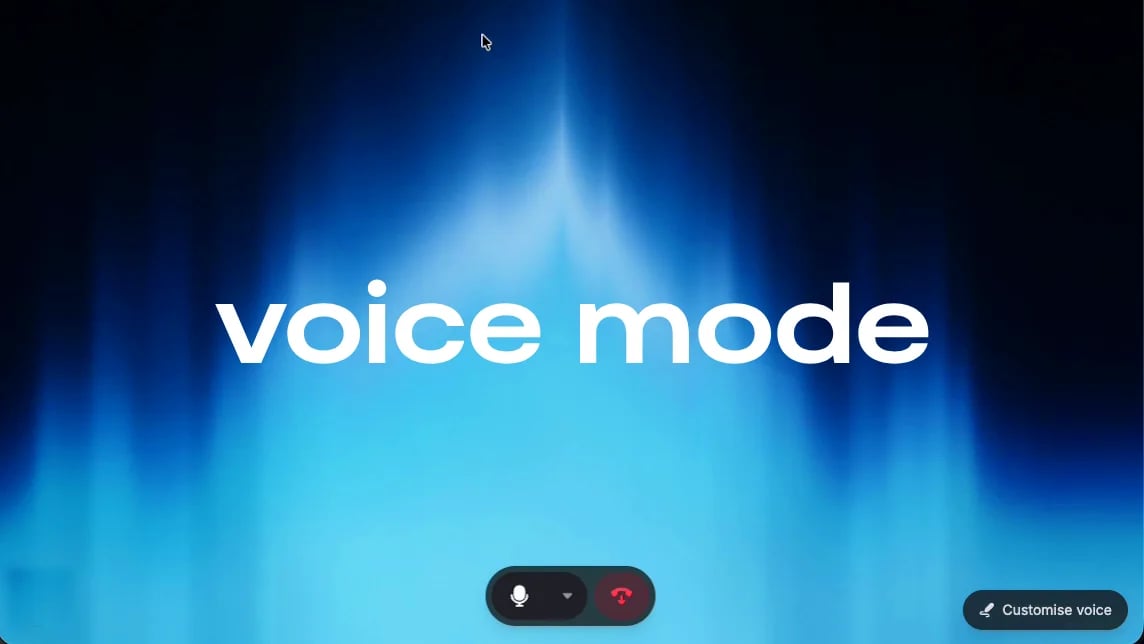
Voice Mode & Smarter Models
You can now talk to GAIA. Voice mode is a real-time, full-duplex conversation backed by LiveKit — GAIA listens while you speak, answers out loud, and can do everything in a call that it can in a chat. Paid plans also move to a sharper model, and GAIA now shows its thinking as it works.API v0.20.0
Features
- Real-Time Voice Mode: Talk to GAIA in a live, full-duplex call powered by LiveKit. A dedicated voice worker bridges your audio to the same agent that runs text chat, so voice has the full toolset — GAIA acknowledges right away, then narrates the answer as it works.
- Smarter Paid Model: Paid plans now run on MiniMax M3 (free plans stay on Gemini), with reasoning enabled and provider routing hardened so tool calls and long answers stay reliable.
- Model Thinking in Chat: GAIA streams its reasoning alongside each step and shows it as a collapsible Thinking row inside the tool card, so you can see how it reached an answer.
- User Skills in Settings: Create, edit, and manage your own skills from a dedicated settings page.
Bug Fixes
- MCP Connections: Migrated OAuth to the official SDK with more reliable auth detection, dynamic registration, and a smoother post-connect flow, plus repaired marketplace data.
- Integrations: Unified per-user cache invalidation so connected integrations are discovered consistently by the agent.
- Agent Reliability: Clearer agent prompting for more reliable generated UI and result surfacing, with subagent conversation history now persisted across turns.
- Code Sandbox: Repaired the sandbox lifecycle and native files API, and hardened the coding tools.
- Background Worker: The ARQ worker now rides out JuiceFS stalls instead of wedging, and the embedding sidecar uses less memory.
Web v0.21.0
Features
- Voice Mode: A new in-app voice experience with live transcription, token-by-token replies, and tool cards that render right inside the call.
- Voice Selection: Pick from a library of 100+ voices with country and language filters, starred favorites, and preview-on-select. Swap voices live, mid-call, from the “Customise voice” popover.
- Model Thinking: Reasoning now appears as collapsible Thinking rows in the unified tool card, at both the main and subagent level.
- Queue Your Next Message: Send a follow-up while GAIA is still replying and it waits in line — the composer’s Send button morphs to Queue, and the queued message shows as pending until it’s picked up.
- User Skills Management: A settings page to manage your skills.
Bug Fixes
- Smoother Streaming: Reworked chat markdown rendering to remove per-token re-render lag and keep long, streaming answers fast.
- Reliable Retry: Retrying a message now works without a page reload.
- Responsive Landing & Pricing: Landing and pricing pages now lay out correctly on smaller screens.
- Desktop Downloads: Download buttons resolve straight to the latest desktop release.
Desktop v0.4.0
Features
- Hey GAIA Wake Word: Say “Hey GAIA” to summon a Siri-style assistant popup and start talking without touching the keyboard.
Mobile v0.6.1
Bug Fixes
- Agent Reliability: Picked up the clearer agent prompting for more reliable generated UI and result surfacing.
Bots v1.4.1
Bug Fixes
- WhatsApp Delivery: Falls back to a template message whenever a free-form send fails, so replies still get through.
API, Web, CLI
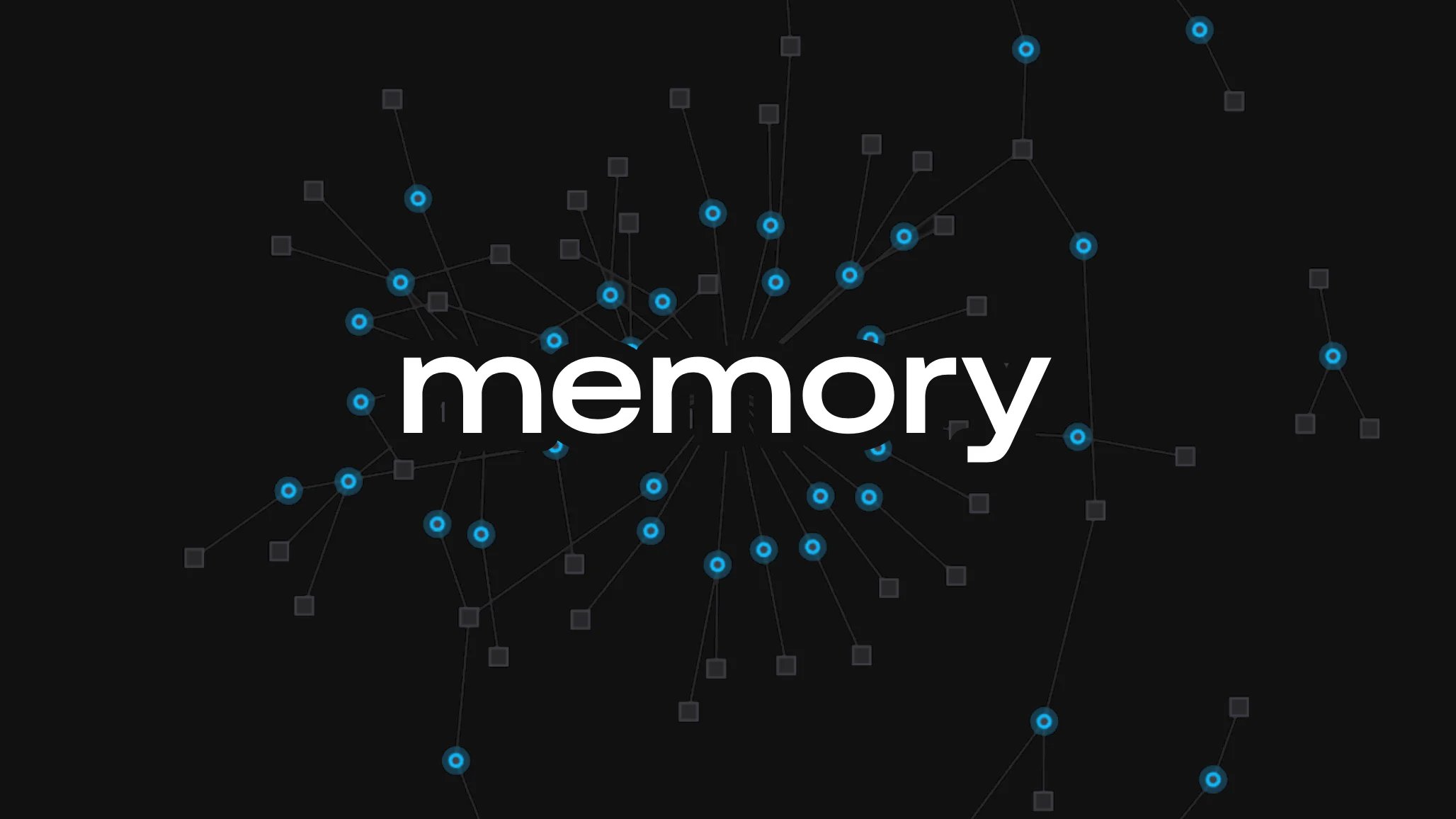
A New Memory Engine
GAIA’s memory now runs entirely on our own infrastructure. We replaced the third-party memory service with a custom engine built on Postgres, Chroma, and Redis with local embedding and reranking models, so what GAIA learns about you never leaves our stack.API v0.19.0
Features
- Local Memory Engine: Rebuilt memory from the ground up as a fully local engine, replacing the previous cloud memory provider. Recall makes no external calls on the read path, so it is faster and more private.
- Four Kinds of Memory: GAIA now organizes what it learns into facts filed in folders, a dated journal of what happened over time, auto-maintained core documents about you, and an entity graph of the people, tools, and projects in your life. See the memory guide for how each one works.
- Sharper Recall: Hybrid semantic and keyword search with local reranking surfaces the right memory even when your request never names it directly.
- Memory Tools for the Agent: GAIA can search your memory, journal, and past conversations, and add, update, or forget specific facts on request, each shown inline as a card in chat.
- Conflict-Aware Updates: When new information replaces something GAIA already knew, it updates the fact and keeps a version history instead of piling up duplicates.
Web v0.20.0
Features
- Redesigned Memory Settings: A new memory page with Folders, Documents, Graph, Journal, and All views, so you can see exactly what GAIA knows and how it is organized.
- Entity Graph View: Explore the network of people, tools, and projects GAIA has connected, and jump from any node to the memories behind it.
- Memory Journal: A collapsible, day-by-day timeline of what GAIA recorded over time.
- Version History: See how a memory changed across updates, and delete anything you don’t want GAIA to keep.
- Email Previews with Avatars: Email addresses in chat now show the person’s name and photo, pulled from your contacts.
CLI v0.4.0
Improvements
- Self-Hosted Memory: Self-hosting now runs the local memory engine out of the box, with no external memory service to configure.
API, Web, Mobile, Bots, CLI

Code Sandbox, Hey GAIA Wake Word & Richer Bots
API v0.18.0
Features
- Code Sandbox: Agents now run code in an isolated sandbox environment, making data analysis, scripting, and file generation safer and more reliable.
- Self-Managing Agent Workspace: GAIA maintains its own working files across a task, so multi-step work carries context from one step to the next.
- Notification Tools: Agents can proactively send you notifications when something needs your attention.
- Agent-Generated Files: GAIA can create files during a task and deliver them straight to you, including over Discord, Slack, Telegram, and WhatsApp.
- GAIA Self-Knowledge: A dedicated subagent lets GAIA answer questions about its own features and how to use them.
- Per-Integration Custom Instructions: Add your own instructions to any connected integration to tailor how GAIA uses it.
- Quick Actions and Community Workflows: Refreshed quick actions plus a seeded set of community workflows to start from.
Bug Fixes
- Overdue Reminders: Reminders that fell past due are now settled and re-armed correctly instead of being skipped.
- Disconnected Integrations: Logged-in users are no longer shown a login prompt when an integration simply needs reconnecting.
- MCP Connections: More resilient MCP sessions with transparent reconnects and instant OAuth.
- Web Research: Prevented fabricated URLs in web search and improved deep research result quality.
- Workflows and Todos: Fixes across workflow execution, recurrence, and tracked todos.
- Security: Patched six high-confidence vulnerabilities found during a security audit.
Performance
- Lower Chat Cost: Byte-stable prompt caching cut chat-stream input cost by roughly 46% with more accurate billing.
- Leaner Backend: Reduced backend memory usage by dropping unused heavy dependencies.
Web v0.19.0
Features
- What’s New in the App: A new sidebar card and settings timeline surface the latest release notes right inside GAIA.
- Redesigned Chat: A cleaner chat interface with less clutter and snappier interactions.
- Revamped Onboarding: A rebuilt onboarding flow with a guided intelligence pipeline and a smoother card reveal sequence.
- Hey GAIA Wake Word: On-device “Hey GAIA” detection so you can start a conversation hands-free.
- Todo Link Previews: Links in todo titles now show inline favicons for quick context.
- Landing Page Overhaul: Updated copy, navbar, pricing, comparison grid, and a live iPhone chat demo.
Bug Fixes
- Integration Reconnect: Logged-in users no longer see a login modal when an integration needs reconnecting.
- Workflow Schedules: Schedule chips on workflow cards now show times in your own timezone.
- Desktop Downloads: Download links now always resolve to the latest desktop release.
Performance
- Faster Landing Page: Largest Contentful Paint on the landing page dropped from about 6s to 0.47s.
Mobile v0.6.0
Features
- Redesigned Chat: The mobile chat interface picks up the same cleaner, faster redesign as the web app.
- Hey GAIA Wake Word: On-device “Hey GAIA” detection for hands-free use on the go.
- Notification Tools and Agent Files: GAIA can send you proactive notifications and deliver generated files on mobile.
Bug Fixes
- Android Stability: Fixed an audio playback crash on Android.
Bots v1.4.0
Features
- Media and Voice on WhatsApp and Telegram: Send and receive images and voice messages directly in your bot conversations.
- Agent-Generated Files: Files GAIA creates during a task are now delivered straight into your bot chat.
- Proactive Bot Messages: Background tasks and notifications can reach you on your connected bot platforms.
Bug Fixes
- WhatsApp Polish: A more reliable typing indicator and welcome message.
- Long Messages: Long replies are split cleanly across multiple message bubbles.
CLI v0.3.1
Bug Fixes
- Self-Hosting Reliability: Fixes for self-host setup and non-interactive terminals, uncovered during end-to-end VM testing.
API, Web, Desktop, Mobile, Bots, CLI
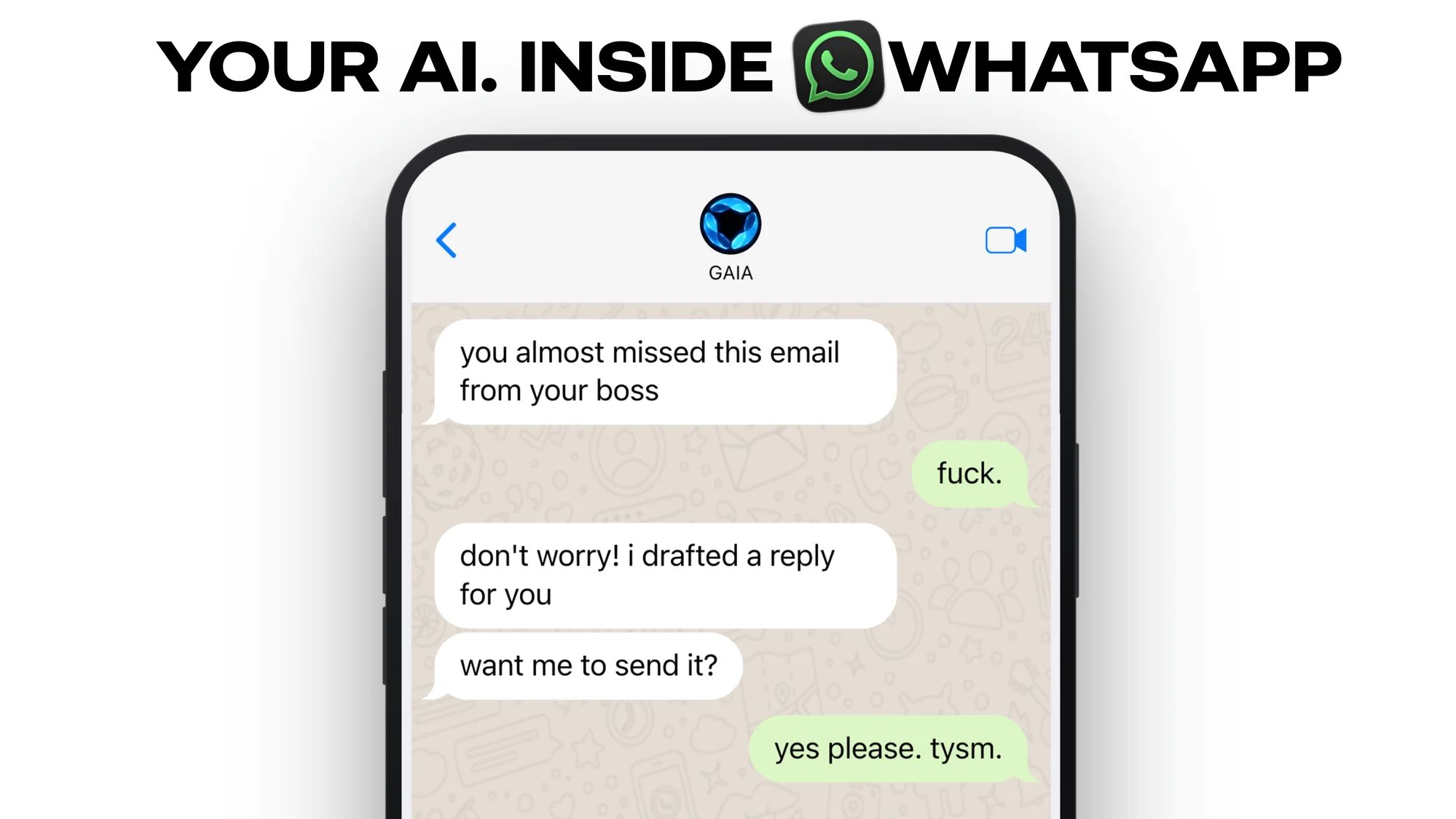
WhatsApp Bot, MCP Apps Builder & Deep Research
API v0.17.0
Features
- WhatsApp Bot Integration: Connect GAIA to WhatsApp so you can chat with your agent directly from your phone’s messaging app. See bots overview for setup details.
- MCP Apps Builder: Build and run custom MCP-powered apps inside GAIA conversations, letting agents render interactive UI components on the fly.
- Deep Research Tool: Agents can now perform multi-step web research with source citations. Free-tier users get search fallbacks so everyone benefits.
- Artifacts: Agents can generate and display rich content like documents, tables, and code in a dedicated panel alongside the conversation.
- Calendar Attendees and Google Meet: Create calendar events with attendees and auto-generate Google Meet links, all from a single prompt.
- Custom Integration Context: Integrations can now pull in relevant context automatically, giving agents better awareness when using your connected tools.
- Streaming Calendar Data: Calendar information now streams to the frontend in real time, so you see results as they arrive instead of waiting for a full response.
Improvements
- Native Marketplace Integrations: The marketplace now highlights native integrations with dedicated cards, making them easier to discover and connect.
Bug Fixes
- Billing Address Country: You can now edit the billing address country on the payments page.
- Backend Stability: Resolved an issue that could cause brief service interruptions under heavy load.
- Web Crawl Reliability: Improved timeout handling and batching when agents crawl web pages, reducing failures on large sites.
- MCP Connection Recovery: MCP connections now automatically refresh expired tokens and display clear status messages when re-authentication is needed.
- Research Tool Caching: Fixed caching and validation in the research tool so repeated queries return consistent results.
Performance
- Todos Performance: Faster loading and smoother interactions across the tasks and todos experience.
Web v0.18.0
Features
- MCP Apps Builder: Build and preview MCP-powered mini-apps directly in the chat interface.
- Artifacts Panel: View agent-generated documents, code, and tables in a dedicated side panel.
- Workflow Toast Actions: Workflow completion toasts now include an “Open” button so you can jump straight to the result.
- Status Banner: A new banner alerts you to service status changes and scheduled maintenance.
Improvements
- Pricing Page Redesign: Updated pricing page with clearer plan comparisons and streamlined checkout.
- Integration Sorting: Integrations are now sorted more intuitively when searching in the marketplace.
- UI Animations and Responsiveness: Smoother transitions and improved layout across screen sizes.
Bug Fixes
- Billing Address Country: Country field on the billing address form is now editable.
- Todo Sidebar: Fixed an issue where the sidebar would not close after deleting the last todo in a filtered view.
- Toast Overflow: Long toast notification titles no longer overflow their container.
Performance
- Todos UX: Significant speed improvements to the tasks and todos view, including faster filtering and smoother animations.
- Frontend Load Times: Reduced initial bundle size for faster page loads across the app.
Desktop v0.3.0
Features
- Artifacts Support: The desktop app now supports the new artifacts panel for viewing agent-generated content.
Bug Fixes
- Server URL Handling: Fixed an edge case where the app could fail to connect when running outside the packaged environment.
Mobile v0.5.0
Features
- WhatsApp Integration: Chat with GAIA on WhatsApp, bringing your agent to your favorite messaging app.
Performance
- Todos Performance: Faster task loading and smoother scrolling in the mobile todos view.
Bots v1.3.0
Features
CLI v0.3.0
Improvements
- Dependency Updates: Updated internal dependencies for improved stability.
API, Web, Desktop, Mobile, Bots, CLI
System Workflows, Agent Skills & Desktop Auto-Updates
API v0.16.0
Features
- System Workflows for Gmail and Google Calendar: Auto-created workflows when connecting Gmail or Google Calendar, delivering ready-to-use automations out of the box
- LangChain Middleware, VFS, and Skills: New middleware layer for LangChain integrations, a virtual file system abstraction, and first-class skills support for agents
- Workflow Prompt and Description Split: Display descriptions and execution prompts are now separate fields, giving users clearer context while preserving precise agent instructions
- Docker Image Optimization: Slimmed down API images by pruning unused dependencies and improving layer caching
Bug Fixes
- Google OAuth Production Settings: Added missing client ID and secret to ProductionSettings for Google OAuth flows
- Dockerfile Ownership and Permissions: Corrected file ownership for the libs directory so setuptools can create package metadata
- Explore Workflow Payload Hardening: Fixed payload handling for the description/prompt split in explore workflows
- Deployment Script Updates: Improved service verification and environment setup in deployment configurations
Web v0.17.0
Features
- Vercel Web Analytics: Production usage tracking integrated into the Next.js frontend
- Cloudflare Deployment Support: Added Wrangler configuration, SSR chunk analysis scripts, and deploy/preview commands for Cloudflare Pages
- Server API Base URL Centralization: Consistent API base URL handling across all server components via a shared utility and new provider architecture
- OAuth Success Toast: Reintroduced global OAuth success notifications for a smoother post-auth experience
Bug Fixes
- LazyMotionProvider for Animations: Wrapped Navbar and main content in a lazy-loaded Framer Motion provider, reducing initial bundle size
- SEO Consolidation: Unified crawl and index signals across all pages, removing SEO drift and conflicting directives
- Icon Consistency in Calendar: Replaced ad-hoc icon components with the standard Chevron component in Calendar and DateTimePicker
- Base URL Refactor: Migrated all base URL references to use siteConfig for consistency across environments
Desktop v0.2.0
Features
- Deep Linking: Protocol handler registration enables opening GAIA links directly in the desktop app
- Branded Splash Screen: New splash screen with refined appearance during app startup
- Auto-Updater: Built-in automatic update support keeps the desktop app current without manual downloads
- Modular Window Management: Refactored window lifecycle into a modular architecture for better maintainability
Bug Fixes
- Server Shutdown Reliability: Fixed graceful shutdown behavior and refined login UI styling
- Safer Protocol Registration on Linux: Replaced execSync with spawnSync to prevent shell injection during protocol handler setup
Mobile v0.4.0
Features
- LangChain Middleware and Skills Support: Mobile app now benefits from the shared LangChain middleware layer, VFS abstraction, and agent skills system
- Dependency Updates: Updated package dependencies for improved stability and compatibility
Bots v1.2.0
Improvements
- Docker Image Optimization: Slimmed down bot container images with pruned dependencies and improved layer caching
- Dockerfile Permissions Fix: Corrected file ownership and permissions for better runtime access
CLI v0.2.1
Bug Fixes
- Dependency Updates: Updated package dependencies and aligned with new Cloudflare configuration
API, Web, Bots, CLI

Discord, Slack, Telegram Bots & CLI Setup
API v0.15.0
Features
- Bot Platform Endpoints: Comprehensive API endpoints for bot platform integration, supporting Discord, Slack, and Telegram authentication and messaging
- Streaming Keepalives and Retries: Server-sent keepalive events and client-side retry logic for transient streaming errors, with adjusted timeout thresholds
- Multi-Channel Notifications: Push notifications to Telegram and Discord channels, letting GAIA proactively reach users on their preferred platform
- Secure Platform Linking: Token-based platform linking flow with WorkOS SSO return URL handling, enabling users to connect bot accounts to their GAIA identity
- Bot API Key Authentication: Dedicated middleware for bot API key auth, isolating bot traffic from user session auth
- Integration Status in Responses: API responses now include integration connection status, surfaced in bot settings UI
Bug Fixes
- User ID Fallback: Added user ID fallback from metadata in handoff and retrieval nodes, preventing orphaned conversations
- Subagent Web Search: Resolved KeyError in subagent web search tool and OpenRouter credit handling
- MCP OAuth Validation: Raises a clear error when OAuth tokens are missing in the MCP client instead of failing silently
Performance
- Agent Flow Latency: Optimized agent execution flow to reduce tool-calling latency across all agent nodes
Web v0.16.0
Features
- Bots Landing Page: Dedicated landing page introducing GAIA bots with platform highlights, setup instructions, and invite links for Discord, Slack, and Telegram
- Discord Bot Landing Page: Standalone page for the Discord bot with feature overview and one-click server invite
- Platform Linking UI: New settings panel where users can link and manage their Discord, Slack, and Telegram accounts
- Docs Structure and Styling: Overhauled documentation site with improved navigation hierarchy, component styling, and content organization
- CLI Installation Page: Dedicated page walking users through CLI installation and first-run setup
- Multi-Channel Notification Settings: UI for configuring which platforms receive proactive notifications from GAIA
Bug Fixes
- Bot Deployment Audit: Fixed deployment, security, and functional issues uncovered during the comprehensive bot audit
- CLI Polish: Minor UX improvements to CLI-related pages and documentation flows
Bots v1.1.0
Features
- Discord Bot: Full-featured Discord bot with slash commands, DM support, context menu commands, rotating presence status, and a welcome message for new DM conversations
- Slack Bot: Slack integration with threaded conversations, streaming responses, and workspace-level authentication
- Telegram Bot: Telegram bot with serialized message updates, Markdown parsing, and streaming message break handling
- Streaming Responses: Real-time streamed replies across all three platforms with dynamic message editing and new-message-break logic for long responses
- Platform Linking: Secure account linking from any bot to a GAIA account using one-time link tokens and SSO
- Help and Settings Commands:
/helpand/settingsslash commands displaying available actions and current configuration per platform - Stop and Unlink Commands:
/stopto end the current conversation and/unlinkto disconnect a bot account from GAIA - New Command:
/newcommand to start a fresh conversation without carrying prior context - Centralized Bot Configuration: Unified configuration with Infisical secret injection across all three bots
- Nx and CI Integration: All bots integrated into the Nx workspace, CI pipeline, and release system with per-bot Docker builds
- E2E Test Package: Dedicated end-to-end test package for cross-bot integration testing
Bug Fixes
- Public Context Restriction: Bots now restrict context to public information only, stripping mentions and enforcing rate limit feedback
- Security and Deployment Audit: Comprehensive fixes for deployment scripts, authentication flows, and functional regressions across all three bots
- Discord Timeout Fix: Resolved timeout issues in Discord bot responses by deferring long-running interactions
- Streaming Thinking Removal: Removed visible “thinking…” indicator from Discord streaming responses
- Docker Image Tags: Fixed missing image tags and corrected Docker build commands for all three bot images
CLI v0.2.0
Features
- Init Command: Guided initialization flow that clones the repo, installs dependencies, configures environment variables, and starts services
- Status Command: Real-time dashboard showing running services, ports, and health status
- Stop Command: Graceful shutdown of all GAIA services with cleanup
- Branch Selection:
--branchflag oninitto clone a specific Git branch for development or testing - Docker Support: Full Docker Compose integration with prerequisite checks, detailed error messages, and service management
- Port Conflict Detection: Automatic port availability checks during init with clear conflict resolution guidance
- Logging Dashboard: Live log streaming UI during service startup with per-service filtering
- Post-Start Health Verification: Automatic health checks after startup to confirm all services are responding
- npm Distribution: Migrated packaging from Bun to npm for broader compatibility and simpler installation
Bug Fixes
- Graceful Shutdown: Added SIGINT and SIGTERM handlers across all commands to prevent orphaned processes
- Input Timeout: Optional timeout on interactive prompts to prevent infinite hangs in CI or unattended runs
- Port Validation: Port numbers are now validated to the 1-65535 range before use
- Windows PATH Detection: Multi-package-manager PATH detection and Windows support for cross-platform compatibility
- Log Buffer Memory: Extracted log buffer sizes to shared constants, reducing memory pressure in long-running sessions
- React Key Stability: Improved LogWindow component key stability to reduce unnecessary re-renders during streaming
Bots, CLI
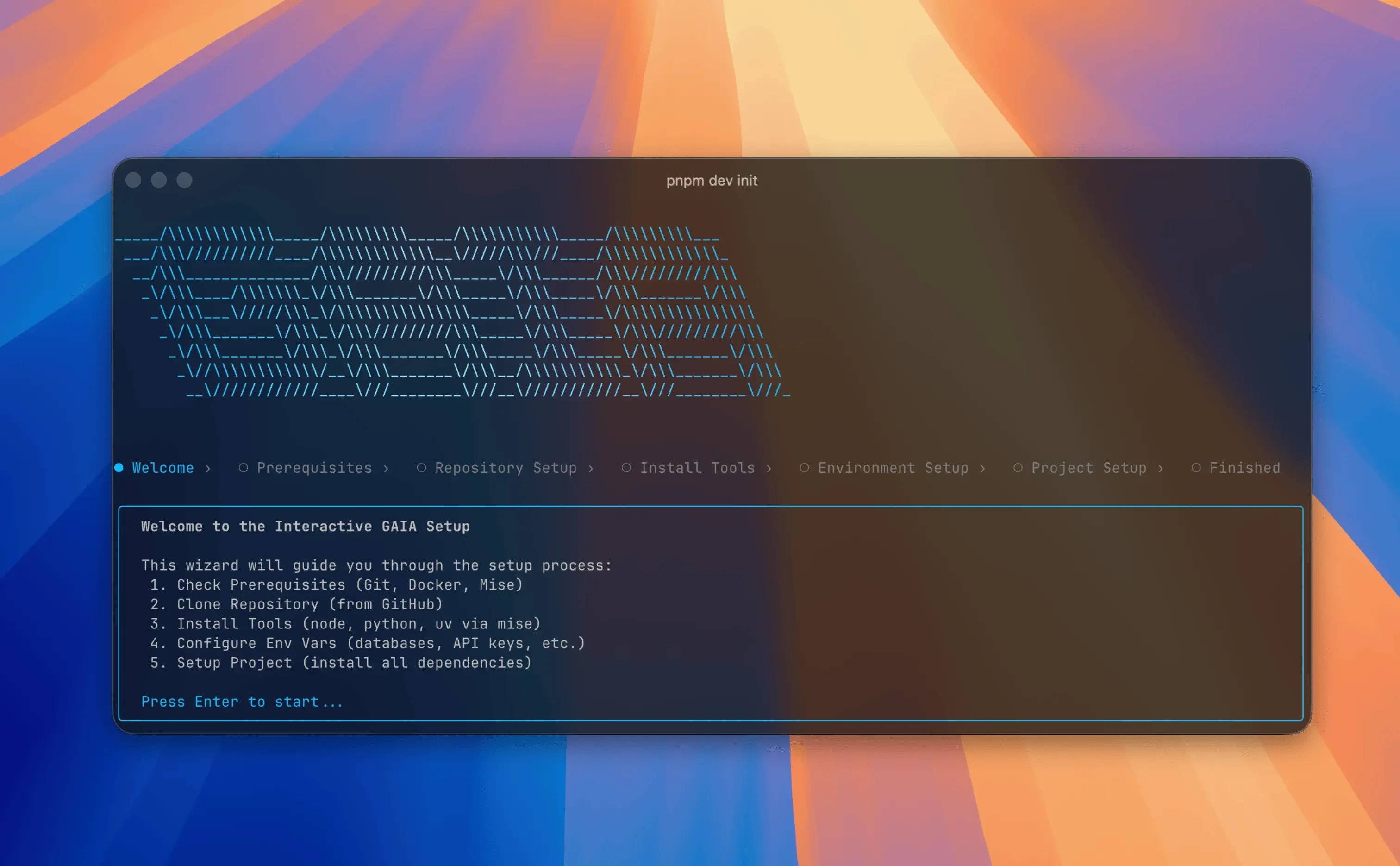
Initial Bots & CLI Release
Bots v1.0.0
Infrastructure
- Shared Adapter Pattern:
BaseBotAdapterin@gaia/sharedestablishing the unified command dispatch system, GAIA API client, and platform-agnosticRichMessageTargetinterface used by all three bots - Bot API Key Authentication: Dedicated middleware for authenticating bot-to-API requests independently from user session auth
- Nx Monorepo Integration: All three bot packages integrated into the Nx workspace with build, lint, type-check, and release targets
- Docker Support: Dockerfiles for each bot for containerized deployment alongside the rest of the GAIA stack
- E2E Test Package: Dedicated
bots-e2etest package with Vitest infrastructure for cross-bot integration testing
CLI v0.1.0
Features
- Core Commands:
init,setup,start,stop,status, andlogscommands covering the full self-hosting lifecycle - Interactive Terminal UI: Built with Ink (React-in-terminal) for a rich, step-by-step setup experience with live progress display
- Docker Compose Integration: Full service orchestration via Docker Compose with prerequisite validation and detailed error messages
- Self-Host and Developer Modes:
startsupports both a full self-hosted stack and a developer mode that runs only infrastructure services locally --branchFlag: Clone a specific Git branch duringinitfor development or testing against unreleased code- npm Distribution: Published to npm as
@heygaia/cli, installable vianpxor acurlinstall script
API, Web, Mobile, Desktop
Workflow History, Analytics & Automated Creation
API v0.14.0
Features
- PostHog analytics unified across frontend and backend for end-to-end event tracking
- Automatic workflow creation lets GAIA generate workflows from natural language descriptions
- Execution history tracking and storage for all workflow runs
- MCP orchestration overhaul with improved tool indexing, namespace normalization, and integration cleanup
- Pricing update reflecting the new $30/month tier with adjusted usage limits
Bug Fixes
- Webhook idempotency for DodoPayments, preventing duplicate processing of already-handled events
- Timezone-aware scheduled tasks that reschedule past-due jobs instead of triggering Redis PSETEX errors
- MCP namespace normalization resolving schema breakage and connection failures with PostHog and Twitter integrations
- Integration sidebar fixes for display names and MCP-related rendering issues
Web v0.15.0
Features
- Interactive demo sections on the landing page showcasing chat and workflow capabilities with live animations
- Deep linking via query parameters, enabling direct navigation to specific views from external links
- FAQ structured data and SEO enhancements for improved search discoverability
- Execution history UI displaying workflow run status, timing, and output details
- Blog and manifesto updates for the “Tool Calling Works” post with minor landing page improvements
Bug Fixes
- Sidebar layout adjusted for improved responsiveness across screen sizes
- User reference resolution fix preventing broken profile lookups
Mobile v0.3.0
Features
- Automatic workflow creation mirroring the web experience for on-the-go automation
- MCP tooling and execution history support aligned with backend orchestration improvements
Desktop v0.1.1
Bug Fixes
- Release workflow updated to correctly handle desktop-v tags and extract version numbers during CI builds
API, Web
Background Tasks & Streaming Tool Outputs
API v0.13.0
Features
- Background Task Management: Overhauled background task lifecycle with improved scheduling, status tracking, and message persistence handling
- MCP Bearer Token Authentication: Integrations that require bearer tokens can now be connected directly, bypassing the OAuth flow entirely
- Integration Suggestion Search: Smarter word-based matching when suggesting integrations, filtering stopwords and searching across name, description, and category
- Optional Bot Configuration: Bot platform keys [Discord, Slack, Telegram] are now optional in production settings, so the API starts cleanly without all bot tokens present
Bug Fixes
- Subagent Stream Cancellation: Users can now cancel long-running subagent and executor streams mid-flight instead of waiting for completion
- Integration Auth Data Sync: Mismatches between stored integration documents and MCP config for auth requirements are detected and auto-corrected
- Build Workflow Project Detection: Fixed affected-project checks in CI and added missing project type to the API configuration
Web v0.14.0
Features
- Animated Loading Indicator: New chat loading component with Framer Motion transitions and a polished shine animation for better perceived responsiveness
- Tool Output Persistence: Tool call outputs now stream to the frontend in real time and persist across page reloads
Bug Fixes
- Chat Message Ordering: Assistant messages are timestamped 1 ms after the user message, guaranteeing correct chronological order in history
- Integration Connection Rollback: Failed OAuth connections now roll back stored credentials and invalidate the cache instead of leaving stale state
- Model Picker Error Handling: Selecting an unavailable model returns a structured upgrade-required error and reverts the picker to the previous selection
API, Web, Mobile
Push Notifications, Voice Mode & MCP Marketplace
API v0.12.1
Features
- Voice Agent added as a new monorepo app with shared Python and TypeScript libraries for real-time voice processing
- Discord, Slack, and Telegram bots introduced with initial implementations and supporting API endpoints
- MCP Marketplace with public integrations page for discovering and connecting third-party tools
- Push notifications backend with device token registration, deregistration, validation, and per-device limit enforcement
- WebSocket notifications with secure authentication via subprotocols for real-time event delivery
- Bearer token authentication for mobile clients with configurable WorkOS redirect URIs
- Memory prompt optimization for improved agent recall and context management
- System prompt management node replacing message deletion, preserving memory messages across agent graph hooks
Bug Fixes
- Fixed streaming issues causing dropped or duplicated messages
- Resolved “no tool results” error when agent tools returned empty responses
- Fixed mobile redirect URI to use settings configuration instead of hardcoded values
- Temporarily disabled auto-loading of tools in production to prevent startup failures
Web v0.13.0
Features
- Real-time notifications via WebSocket with notification provider, permission prompts, and in-app notification center
- MCP Marketplace page for browsing and enabling public integrations directly from the dashboard
- Retry message action allowing users to regenerate a failed or unsatisfactory assistant response
- Voice mode improvements including chat description auto-generated in the sidebar when a conversation starts in voice mode
- WaveSpinnerSquare animation component for richer loading states during voice interactions
- Memory prompt optimization for more accurate and relevant agent recall in conversations
Bug Fixes
- Fixed duplicate voice messages caused by race condition on call end
- Resolved audio bar visualizer sensitivity bug producing erratic waveform rendering
- Fixed streaming issues causing incomplete or stalled message delivery
Mobile v0.2.0
Features
- Chat streaming with SSE client integration for real-time message delivery on mobile
- Push notifications with Firebase Cloud Messaging, custom notification sound, and device token lifecycle management
- Real-time WebSocket notifications with secure subprotocol-based authentication
- Tool data cards and interactive follow-up actions rendered inline within chat messages
- Bearer token authentication replacing cookie-based auth for native mobile sessions
- Zustand state management integrated across the app for consistent global state
- Settings sheet with redesigned chat UI components and styling utilities
- Connect drawer for quick access to integrations from the chat input
- Chat history with dynamic loading, multi-part message support, and progress indicators
- Playful AI thinking messages with animated loading states in chat bubbles
- App logo and splash screen updated to new branding
Bug Fixes
- Fixed page stacking when selecting chats by using navigation replacement instead of push
- Improved push notification token management and error handling
- Resolved audio bar visualizer sensitivity bug